TICKETS & ACCESS
What does my ticket include?
Your ticket grants access to all matches of the day (men’s and women’s categories), as well as the leisure areas, fan zone, live music, and fan experiences within the venue.
Concerts and performances included in the SVNS programme are also included with your ticket.
Where can I find my ticket?
You can find your ticket in your Fever app if you purchased it through our website, or as a PDF in your email if you purchased it through the official SVNS website.
Are weekend passes available?
Yes. We offer 2-day and 3-day passes at a reduced price so you can enjoy the entire competition.
We also offer 2-day and 3-day VIP passes for those looking to enjoy a premium experience.
Do I need to print my ticket?
No. You can access the venue by showing your ticket on your phone, either through the Fever app or the PDF received by email.
We recommend arriving with enough battery and your screen brightness at maximum to speed up entry.
Can I exchange or refund my ticket?
No exchanges or refunds are allowed once the purchase has been completed, except in the event of cancellation.
What time do the gates open?
The gates will open approximately 60 minutes before the start of the first match each day.
Estimated opening times:- Friday: 9:00 AM
- Saturday: 9:00 AM
- Sunday: 9:00 AM
We recommend arriving early to enjoy the fan zone and avoid queues as the entrances. Can I leave and re-enter the event?
Yes. Each attendee will have a maximum of 2 entries per day, meaning you may leave and re-enter once during the day.
Is the venue accessible for people with reduced mobility?
Yes. The venue has accessible entrances to ensure that people with limited mobility can enjoy the event in the best possible conditions.
Are there lockers available during the event?
No. The venue does not provide a locker service.
We recommend bringing only what you need and checking the access rules before the event.
Can I remove my wristband if I’m returning the next day?
No. The same wristband must be used for all days, so please do not remove it if you plan to return to the venue the following day.
FOOD, DRINK & SAFETY
Can I bring my own food and drinks?
Yes, packaged food for individual consumption such as snacks or sandwiches will be allowed.
As for drinks, only plastic bottles up to 500 ml without caps will be permitted, in accordance with current safety regulations.
The following items will not be allowed:- Glass containers
- Cans
- Alcoholics beverages
- Coolers
- Tupperware or rigid containers
In addition, the venue will feature a wide range of food options and food trucks. Can I bring a backpack into the venue?
Yes. Backpacks are allowed as long as they comply with the venue’s safety regulations and do not contain prohibited items.
Which items are prohibited inside the venue?
The followings items are not allowed:- Helmets
- Suitcases
- Glass containers
- Cans
- Alcoholic beverages
- Coolers or rigid food containers
The organisers may restrict any other item considered dangerous or inappropriate for the event. Can I pay with cash inside the stadium?
The event operates using a cashless payment system.
However, top-up points inside the venue will accept cash payments to load credit onto your wristband or event payment method.
Will there be free water or fountains inside the venue?
Yes. The venue will have free hydration points and water fountains.
You may also bring plastic water bottles up to 500 ml without caps, in accordance with current safety regulations.
Glass, metal, or rigid containers will not be permitted.
Are there lockers to store personal belongings?
No, unfortunately there will be no lockers available for personal belongings.
FAMILIES & CHILDREN
At what age do children need a ticket?
Children under 3 years old enter free of charge as long as they do not occupy a seat.
We also offer reduced-price children’s tickets for ages 3 to 14.
Is this event suitable for children?
Yes. SVNS offers a family-friendly atmosphere and will feature children’s activities, play areas, and entertainment for all ages.
Can I bring a stroller?
For safety and comfort reasons, some areas may have access restrictions. In such cases, designated spaces will be available near the seating areas to leave strollers.
GETTING AROUND VALLADOLID
How do I get to the stadium?
We recommend using public transport.
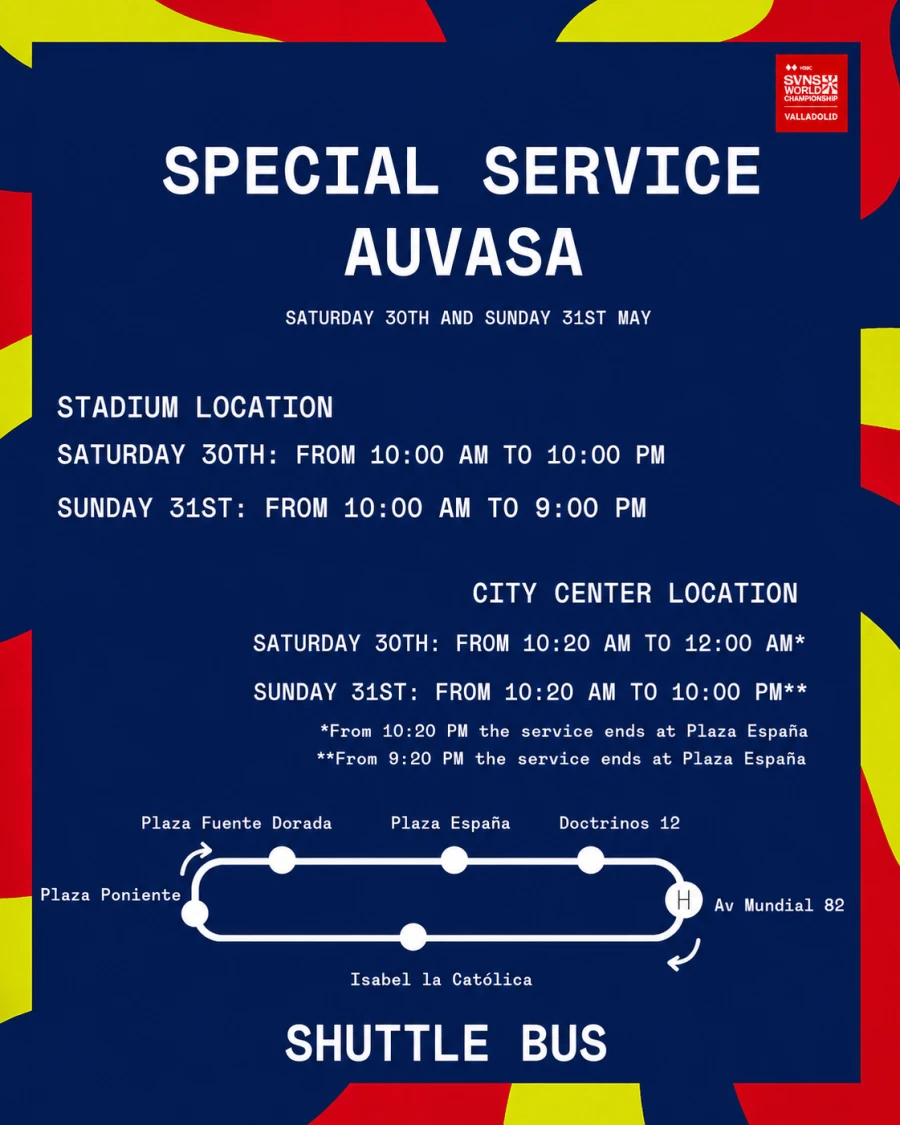
During the event, special shuttle services will operate from Valladolid city centre to the stadium. Special AUVASA Service.
Is parking available?
No. The event will not provide official parking for attendees.
THE SVNS EXPERIENCE
Is there a dress code?
Yes! One of the great SVNS traditions is enjoying the tournament in costume.
We encourage all fans to come dressed in original costumes and in groups to fill the stands with colour and fun.
Will official merchandise be available for sale?
Yes, inside the venue you’ll find official stores with exclusive SVNS Valladolid merchandise.
Will food be available inside the stadium?
Yes. The venue will feature a wide range of food options, food trucks, and bars throughout the fan village.
What are the weekend opening hours?
- Friday: 9:00 AM to 10:00 PM
- Saturday: 9:00 AM to 11:00 PM
- Sunday: 9:00 AM to 9:00 PM
Is the venue covered in case of rain?
The event has some covered areas, but not all of it.
In case of rain, we recommend bringing a raincoat or suitable clothing.
Are there mobile phone charging stations?
No. The venue will not provide charging points for mobile phones.
Are professional cameras allowed?
No. Only mobile phones and non-professional cameras will be allowed.
Are there shaded or rest areas inside the fan village?
Yes. The fan village will include shaded areas and rest zones for attendees.
PAYMENT METHODS AT WORLD SVNS
What is the payment method at World SVNS?
The payment method at World SVNS will be cashless, using the wristband provided when your ticket QR code is validated.
What are tokens and what is the wristband used for?
1 token = €1. The wristband is the only payment method accepted inside the venue. You can use it to purchase food and drinks at the food trucks and bars.
How do I add money to my wristband?
You must add tokens to your wristband by topping it up with money either in advance through the Fever website or during the event by scanning the unique QR code located on your wristband chip. You may also go to any of the designated top-up points inside the venue to add funds using cash or card.
What happens if I haven’t bought tokens yet?
You can still take advantage of exclusive promotions in the add-ons section until the day before the event. During the event days, you will be able to top up through the Fever Wallet in the app (activated on Friday once accredited) by scanning your wristband QR code, or at the physical top-up points.
Can I top up tokens using cash or card?
Yes. At the physical top-up points we accept both cash and credit/debit cards.
What happens if I lose my wristband?
Very important! As soon as you receive your wristband, take a photo of the code on the back. If you lose it, go to the incident/help desk at the entrance with that photo; we will provide you with a new wristband and recover your token balance.
How can I check my wristband balance or transaction history?
You will be able to check this in the “Transactions” section of the Fever Wallet by scanning the unique QR code on your wristband. Make sure you have downloaded the app before arriving at the event for the best experience.
Do I need an account to top up?
To top up through the Fever Wallet, we recommend logging in to your account. This will provide a smoother payment experience and make it easier to request a refund for any remaining balance later on.
ACCREDITATION & ACCESS
Where can I collect my wristband?
At the event entrance you will find accreditation points where you can collect your wristband by showing your ticket QR code through the Fever app or the ticket PDF sent to your email. If you purchased tokens in advance, please inform the accreditation staff so they can activate them at that moment.
What documentation do I need to present to collect my wristband and access the event?
It is mandatory to present the QR code of your ticket through the Fever app or show the PDF received via the email used for your purchase. Printing your ticket is not required.
In addition, the security team may request your ID at the entrances.- Under 16 years old: Must present official authorisation and attend accompanied by a parent or legal guardian.
- Between 16 and 18 years old: Must present signed official authorisation.
REFUNDS
What happens if I don’t spend all my tokens?
Buy with confidence! We will refund the value of any unused paid tokens (gift tokens are non-refundable). For the best experience, it is essential that you have the Fever app downloaded.
What are the dates to request and receive my refund?
You may request a refund for unused recharged tokens from Tuesday, 2 June until 12 June 2026. You will have a period of 10 days to submit your request.
Once this period has ended, we will begin processing refunds. The money may appear in your account within 1 to 10 business days, depending on your bank.
What do I need in order to receive my refund?
It is important not to throw away your wristband after the event if you have not yet scanned it with the app, as it will be required to request your refund.
If you have already scanned your wristband in the Fever app, you will be able to manage your refund directly through the app without needing to keep the physical wristband.
Even so, we recommend taking a photo of the wristband as a safety measure.
Do I need to update my Fever app to request my refund?
Yes. Please make sure you have the latest version of the Fever app installed in order to manage your Wallet and process your refund request correctly.
How do I request a refund if I have multiple wristbands?
If you linked more than one wristband to your account, you must scan each one again before requesting your refund. Otherwise, the system will only process the last wristband you registered.
Are gift tokens refundable?
No. Gift tokens are non-refundable. The system always spends your paid balance first.
Example: If you have €100 paid balance + €20 gift balance and you have €15 remaining, the system will detect that the remaining amount belongs to the gift balance and it will not be refunded.
For this reason, it is normal for the refunded amount to be slightly lower than the total balance displayed in the app.




 International Showcase
  Vibrant Atmosphere
  All Ages Welcome
  Single-Day Ticket
  2-Day Pass
  3-Day Pass
  VIP 2-Day Pass
  VIP 3-Day Pass


 FAN ZONE
  ARTISTS
  INTERNATIONAL RUGBY 7S